Raisers Edge Feed File Automation Process
by
Vito A. Volpe, Jr., M.S.I.S.
1. Raisers Edge output looks like this:
The above layout was used for our old FRS system. The only thing done for Banner was to have the Debit and Credit fields expanded.
Blackbaud charged $700 for this change. They wanted to charge several thousand dollars for a complete customization. I spoke to the
VP of Alumni Development at the time and told her to just have them expand the Debit and Credit fields. In order to get files in the
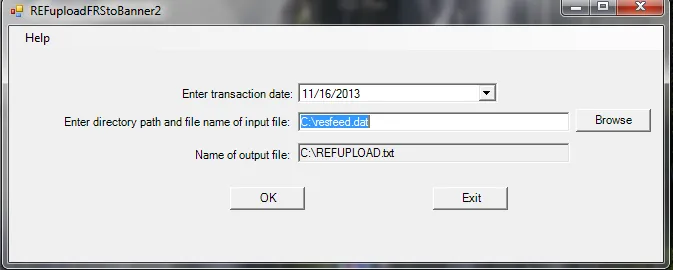
proper Banner FUPLOAD layout I wrote a program at no cost to the university. The program is installed on two computers in the Advancement
Office and run by personnel there.
Files in the format above are run through my program:
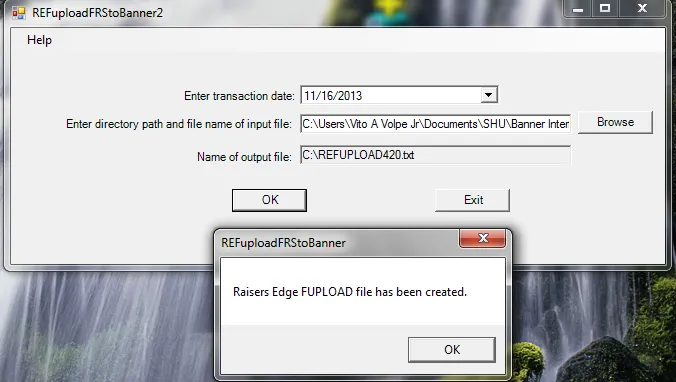
Output looks like this and is in the proper format to be fed into Banner:

In July of 2013, the Alumni Development group decided to use the Event module and have those charges fed into Banner. Since there were no coding changes
in the Event module, Blackbaud wanted to charge approximately $7,875 for a customization. The Director of Advancement Operations did not want to spend
that much money so Blackbaud recommended a vendor they work with called PostOmatic. PostOmatic wanted $2,800 plus $700 for set up of their solution. I
looked over the documentation for the PostOmatic solution and had a conference call with them along with the Director of Advancement Operations. Based
on the documentation and the questions I asked during the conference call, I knew this software was not going to be a solution. I took a look at my
existing program and was able to make the necessary coding changes. I saved the university another several thousand dollars and everything was transparent
to the end user from the perspective of my program. Everything was done in the code, and the user didn't have to do anything differently.
- Once files are in the proper Banner format they are e-mailed to Finance from Advancement. Files can be e-mailed on any business day and
at any time.
- Finance has to download the files and place them on 'P:\ExternalSources\fin'.
- Finance has to run an AppWorx job called 'SHU_FIN_IMPORT_TO_BANNER' to get files uploaded to a Banner server. This job has to be run for
every input file.
- Finance has to manually run FUPLOAD, FURFEED, FGRTRNI and FGRTRNR from Banner.
- If there is a problem in any input file, the input file needs to be corrected, put back on 'P:\ExternalSources\fin', then
'SHU_FIN_IMPORT_TO_BANNER' needs to be run to get the file back on the Banner server, then FUPLOAD, FURFEED, FGRTRNI and FGRTRNR need to
be run again.
- Once everything has posted correctly an e-mail message is sent to several people in Advancement to let them know.
NOTE:This is not a efficient use of time and resources.
The new automated process is as follows:
- Advancement creates files from Raisers Edge and run them through my program to get them in Banner format.
- The files are no longer e-mailed, they are placed on a network drive - 'P:\ExternalSources\fin\RaisersEdge\input'.
- An AppWorx job called 'SHU_FIN_RE- BANNER_FEED' will run once every night Monday through Friday on a schedule.
- Whatever files are on the network drive will be processed. There is a maximum of 8 files that will be processed. Any other files
on the drive will be processed the next night.
- If there is an error in an input file the AppWorx job will stop. The file will have to corrected and put back on the network drive.
Another AppWorx job called 'SHU_FIN_RE-BANNER_RESET' has to be run to clear the queue. This job has to be run by Finance. The file
will be processed the next night. The AppWorx job will stop if there is invalid index or fund, trying to post in a period that has been
closed, etc. The job will abort is someone places a file on the network drive that is not in the correct FUPLOAD layout.
- There will be e-mails sent to the 'Banner_Advancement' and 'Banner_Finance' e-mail groups that will indicate if there are errors.
Finance will have to keep an eye on these e-mails to make sure nothing is being held up by errors.
- Output from FUPLOAD, FURFEED, FGRTRNI and FGRTRNR are sent to e~Print.
- In an emergency situation, when files need to be processed during the day, the AppWorx job can be run manually.
The new process:
- Will be more secure being files are placed directly on a network drive and not sent through e-mail.
- Is more defined on how and when input files will be processed - Monday through Friday one time on a nightly basis.
- Will free up Finance personnel to do more productive work and Advancement doesn't have to rely on Finance to get their data posted.
Currently, sometimes data may not get posted for days if someone is on vacation, in training or there are other work priorities.
- Will allow Advancement to have data posted daily if they so desire.